Thursday, November 12, 2020

Microservices for the better performance

 I'm starting to be a fan of API based communication and content loading. In this blog I shortly describe why.

Let’s have a blog page which is a bit like this page. It has following components:

  • Menu
  • Content (this text+title)
  • Comments

Let’s first look at the life cycles of these parts:

  • Comment - it’s changing whenever someone sends the comment. So it’s changing quite often at the famous blog. Each blog entry has its own comments.
  • Menu - it’s changing when new content is coming or the titles are updated. The menu is practically the same at every page. 
  • Content - every page has its own content and it’s not changing very often after it has been published. In most cases it’s not changing at all. (Well - maybe some typo fixes but not much more than that.)

First we have the traditional architecture which e.g. Wordpress is using. It doesn’t have any API. It just constructs the whole page at the server and returns it. So you’re every time loading the menu, content and comments. You can’t cache any of this data easily or you risk that people are missing the comments. Or if you think it’s possible to create the cache and then invalidate it whenever there are any changes the process is quite complex. With pseudo code:

  • If menu changes -> Invalidate all pages which has menu - this is the loop and the invalidation process must know what pages has the menu
  • If content changes -> Invalidate the content of that page
  • If there is comment -> Invalidate the content of that page

The menu changes are expensive. After that all page loads are hitting the backend for a while. 

What if we create API based communication? The ‘static’ web page is a bit of HTML without any content, JavaScript and CSS files. The APIs are Menu, Content and Comments. Below is the architecture picture of the system. User's cache can be e.g the internal cache of the browser or the proxy of Internet Service Provider.


There’s good chances that the Content does not have to hit the real storage ever after it has been loaded for the first time. Content cache TTL for the local cache can be forever. We can easily invalidate that. The story for the remote caches are different. The TTL can be e.g. 30 seconds. In that case the user’s cache does not store the data for a long time. But instead of hitting our Content service it hits our local cache.

When the data at the Menu changes we don’t have to create a complex loop which invalidates the cache. We have only one call which invalidates the cache of the menu of all pages. This simplifies our rules a lot. The rule for the local cache can be “forever”, but for the users’ caches it can be e.g. 30 seconds or even shorter.

The caching of Comments API depends what the features are. If it gives the user the possibility to modify or delete his comment, then this API cannot be cached for the user who is logged in. There can be more complex rules for caching the Comments API. User logged in -> Never cache. Anonymous user -> Always cache, but invalidate when new comments are written.

Good microservice architecture can improve the performance with the good caching policies. The APIs can have their own life cycles and caching rules should follow those. In many cases it’s enough that the component sets proper caching headers. But to separate the different caching rules for local cache and user’s cache the caching application must be able to modify those.

P.S. Good caching lowers also the infrastructure costs and increases the reliability of the  system.


Friday, August 14, 2020

Kubernetes (and Azure AKS) RBAC description


Part of the Kubernetes security is to use RBAC for the authentication and authorization. There’s plenty of short articles about that, but I didn’t find any good and complete  “how to”-instructions. I hope this will be such. If you want me to clarify something, add it to the comments please. This is done from the Azure AKS point of view when it is integrated with AAD. But many things are the same in other clusters also.

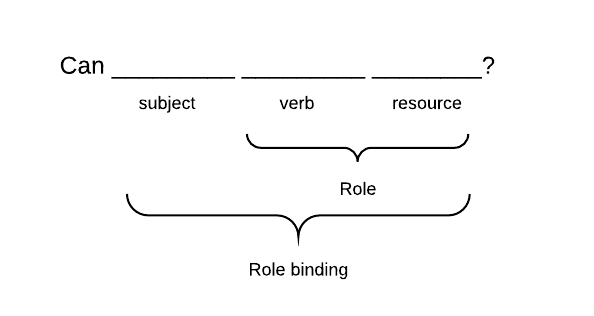
Here’s the description what kind of parts the Kubernetes role and role binding has:

In this terminology “Role” is describing what the binded identity can do. The identity can be a user, group or service account. Roles can be binded to multiple identities. Let’s start to look at the things backwards and start from the Role binding.

kind: RoleBinding
apiVersion: rbac.authorization.k8s.io/v1
metadata:
name: <name for the binding>
subjects:
- kind: Group
name: <AAD group ID>
roleRef:
kind: Role
name: <name of the role>
apiGroup: rbac.authorization.k8s.io


Role binding is describing what identity can use the role. For humans the identity is group or single user. The service account is for those pods which have to access the apiserver. User is a single user (like testuser_1@youaaddomain.onmicrosoft.com). The role binding to the single user is useful only if you have a few (less than two) users. With more than one user it will become complex and time consuming to maintain. At AKS AAD integration the Group is the object ID of the AD group. E.g. 6ec5b8f7-823c-491c-97d6-977ae68afbf3.

kind: Role
apiVersion: rbac.authorization.k8s.io/v1
metadata:
namespace: <mandatory for Role>
name: <name of the role>
rules:
- apiGroups:
- ""
- <some other API group>
resources:
- <resource>
- <another resource>
verbs:
- <verb 1>
- <verb 2>
- apiGroups: # Another block - there can be any number of objects
- <some other API group>
resources:
- <resource>
- <another resource>
verbs:
- <verb 1>
- <verb 2>

The verbs are actions which are allowed. The resources has the following verbs: Create, Get, List, Watch, Update, Patch, Delete, Deletecollection. Addition to those there are several special verbs: 
  • use verb for the podsecuritypolicies in the policy API group
  • bind and escalate verbs on roles and clusterroles resources in the rbac.authorization.k8s.io API group
  • impersonate verb on user
You have to read API documentation what each verb exactly does for each resource.

API Group is the group where the resource belongs to. If the resource is a member of the API group, it must be mentioned in the apiGroups part. The empty string is core. All others must be mentioned. When the resource is searched, the Kubernetes checks all API groups which have been defined for this access right object. If you have defined ‘*’ resource for the access rights, it means that any resource from the defined API groups match with this access.

The resources are divided into two separate groups: Namespace resources and cluster resources. For example, a pod is a namespace resource while a node is a cluster resource. The ClusterRoleis only object which can allow access to the cluster resource. ClusterResource can also allow access to namespace resources. In that case the access is to the resource in all namespaces. The resource binding is done with the ClusterResourceBinding.

If the namespace resources are meant to give access to the specific namespace, the Role is used. The Role defines what namespace is in use. The binding is done with the RoleBinding.

I've created the Kubernetes RBAC Matrix for better readability.

Wednesday, February 27, 2019

MFA, cross account roles and command line


One primary #AWS account #security tool is #IAM roles. My practice is that user without MFA can't do anything. I force the user to assume the role before she can do anything. This can be real pain if you have to manage multiple accounts. Also Terraform has some “issues” with MFA so assuming the role and setting up the credentials to the environment variables is the simplest solution.

The best tool to manage this chaos is awsume. Before using it you have to setup your credentials properly to the shared credentials.

To ~/.aws/credentials I set up the "main account".

1
2
3
[mainaccount]
aws_access_key_id = <accesskey> 
aws_secret_access_key = <secret key> 

The IAM policy does not require MFA for this yet. It doesn’t allow many actions either. Actually if the MFA is not used, then this account is only allowed to set the virtual MFA device and change the console password. (But I’ll have another post about that later…)

At ~/.aws/config I have:

1
2
3
4
[profile dev-website-admin]
role_arn = arn:aws:iam::1234566543321:role/Admin
source_profile = otherprofile
mfa_serial = arn:aws:iam::1234566543324:mfa/myaccountt

Now the credentials are properly set. To assume the role with awsume you only need:
awsume dev-website-admin

It sets the proper temporary credentials and asks the MFA token if that's needed.

Friday, February 22, 2019

AWS Account Alias as part of security

Good AWS practices require that AWS Organizations is used to separate the testing from production. It means that there is multiple AWS accounts to manage. That can be real nightmare where you can accidentally do bad things for the production.

To reduce the risks for accidents I've started to use account aliases to describe which account I'm currently managing. But how to name the accounts? There should be some standard way to name the account. They should clearly tell if the account is dev, testing or production account.

My organization is Bad Boys of Quality. Shortly it's BBoQ. That's good prefix for my accounts. Then dev, test and prod are good labels to describe the state of the environment. The final part should be the descriptive word for the account.

First - and most important account - for organization is master account. It's unique. I've decided that it's production. I've named it to bboq-prod-master. At the shared credentials I've got prod-master-admin profile to administer this account.

At the shared credentials I'm following the same naming convention as account aliases. This way I can easily change my account with awsume.

To set the account alias I would use AWS CLI. I don’t want to mess up the role history of my browser. Before doing anything else I’ve set the role to my shared credentials. I usually use ~/.aws/config for this. So now we are creating alias for bboq-dev-website. First I have to define the shared credential.


1
2
3
4
[profile dev-website-admin]
role_arn = arn:aws:iam::1234566543321:role/Admin
source_profile = otherprofile
mfa_serial = arn:aws:iam::1234566543324:mfa/myaccountt


To set the account alias with AWS CLI the line is:
aws iam create-account-alias --account-alias bboq-dev-website --profile dev-website-admin

One cool side is that when you assume the role at AWS web console, you can use the account alias. So instead of cryptic Admin @ 123456654321 you are Admin @ bboq-dev-website. This reduces the amount on confusions. It again underlines what kind of account is I'm managing. Destruction at dev account shouldn't be bad, but destruction at production is.

So why the account alias is part of security and safety? The more clearly you see things, more easily you notice if something is wrong, and less mistakes you make. I can tell you that before I started to use account alises at naming, I got almost totally lost what I was doing. Juggling with account ids is nearly impossible when you have than 2 accounts. And we have… almost 10 already and part of the teams doesn’t have them yet.

So there is six accounts: development, test and production website and three support accounts. Accounts are named bboq-dev-website, bboq-test-website and bboq-prod-website. Then there’s several support accounts like bboq-prod-accounts (all IAM users are here), bboq-prod-master, bboq-prod-compliance (all logs are going to this one).

Next post will present some ideas how to enhance readability and safety with Terraform and account aliases.

Monday, October 29, 2018

Secure CI deployment pipeline at AWS pt 1: Theory

Jenkins is security nightmare when you want to use it at deployment to production. If the Jenkins node does the deployment, the node has to have all access rights which are needed for deployment. So it might be related to infrastructure, IAM policies, access to AWS secret manager etc. Anyone who has modification access to the Jenkins job, has also full access to all of these. This might be even GDPR related risk, so building the secure deployment needs some thinking.

I'm expecting that every company has multiple accounts at their AWS Organization. The CI pipeline and other DevOps related systems are at the own AWS account. The production and test environments have own accounts. If we want Jenkins node to do the deployment, we'd have to give quite big access rights to production environment for it. That violates the least privilege approach.

So let's start to think about building blogs. AWS Lambda is nice way to run small functions, which can be triggered quite easily. So maybe that can solve part of the deployment process. AWS SNS is good way to start the Lambda. Now if the Jenkins node sends SNS message, which starts the Lambda which starts the deployment process the security is much better. But problem is that Lambda can't execute external applications like kubectl, terraform or some other fancy deployment tool. ECS is really nice for that. If it's executed at Fargate cluster the costs are minimal. But that needs also the feedback to Jenkins. SQS is perfect for that.

The basic architecture is like the diagram below. It's missing e.g. logging related components.


So what we have to program?

  • The script which is executed by CI pipeline. It first sends the triggering message to SNS. Then it starts to listen the feedback queue. Only required cross account permissions are SNS sending and SQS reading.
  • Lambda script which starts the deployment container. Only rights which it needs are starting the ECS container.
  • Deployment container requires the script which submits all standard output and error from deployment process to the SQS. This container should have role which has all required permissions to do the deployment. 
So now we've got the components which are required for the secure cross account deployment. Jenkins can be replaced with almost any CI/CD tool. 

I'll continue this series as soon as I get some programming done.